Backup Dashboard API

Monitor heterogeneous backup systems through one API - track running, successful, partial*, and failed statuses with simple HTTPS calls.

*Partial support available for Generic, JetBackup, and Virtualmin.

API token

If you paste your token here the examples will adjust to it.

Token

Generic API for any backup system

Use these status values to track job lifecycle events.

Running

GET "https://backupdashboard.com/api/v1/job?api_token=secret&frequency=daily&type=incremental&status=running"

Success

GET "https://backupdashboard.com/api/v1/job?api_token=secret&frequency=daily&type=incremental&status=success"

Partially completed

GET "https://backupdashboard.com/api/v1/job?api_token=secret&frequency=daily&type=incremental&status=partially_completed"

Error

GET "https://backupdashboard.com/api/v1/job?api_token=secret&frequency=daily&type=incremental&status=error"
Virtualmin

Send one call before backup and one call after backup. The after call can resolve to success, partially completed, or error.

Note: You only have to specify integration in the start calls.

Full - before backup

GET "https://backupdashboard.com/api/v1/job?api_token=secret&frequency=monthly&type=full&status=running&integration=virtualmin"

Full - after backup

{ if [ "$BACKUP_STATUS" = 1 ]; then [ -n "$BACKUP_ERROR_NAMES" ] && r=partially_completed || r=success; else [ -n "$BACKUP_ERROR_NAMES" ] && r=partially_completed || r=error; fi; echo "$(date -Is) status=$r failed=$BACKUP_ERROR_NAMES"; wget -nv -O /dev/null "https://backupdashboard.com/api/v1/job?api_token=secret&frequency=monthly&type=full&status=$r&failed=$BACKUP_ERROR_NAMES" 2>&1; } >> /root/post-backup-report.log

Differential - before backup

GET "https://backupdashboard.com/api/v1/job?api_token=secret&frequency=daily&type=differential&status=running&integration=virtualmin"

Differential - after backup

{ if [ "$BACKUP_STATUS" = 1 ]; then [ -n "$BACKUP_ERROR_NAMES" ] && r=partially_completed || r=success; else [ -n "$BACKUP_ERROR_NAMES" ] && r=partially_completed || r=error; fi; echo "$(date -Is) status=$r failed=$BACKUP_ERROR_NAMES"; wget -nv -O /dev/null "https://backupdashboard.com/api/v1/job?api_token=secret&frequency=daily&type=differential&status=$r&failed=$BACKUP_ERROR_NAMES" 2>&1; } >> /root/post-backup-report.log
Email backup report recipient is optional but highly recommended.

WHM/cPanel

To use the WHM API, go to Basic WebHost Manager Setup.
Below ICQ and above Slack Webhook URL add this URL: https://backupdashboard.com/api/v1/job?api_token=secret

JetBackup

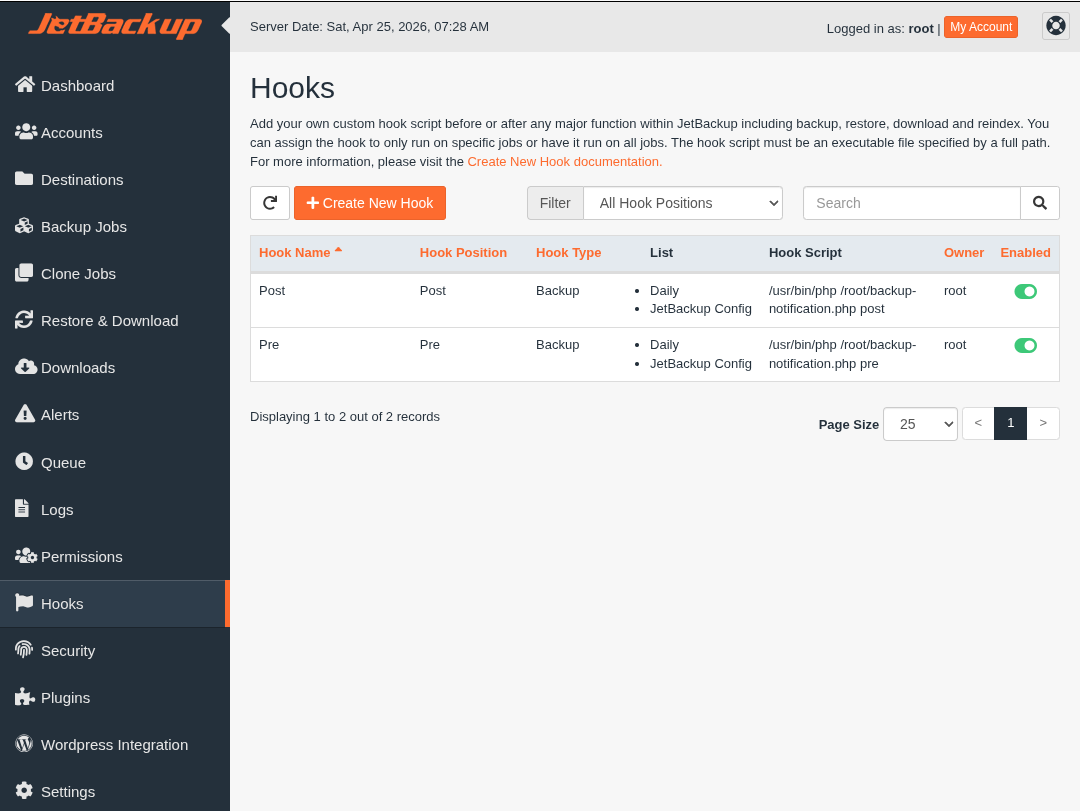
Save a script called /root/backup-notification.php on the server and register it in JetBackup for pre and post hooks.

backup-notification.php

#!/usr/bin/env php
<?php
    if ($argc < 2 || !in_array($argv[1], ['pre', 'post'])) {
        fprintf(STDERR, "Usage: %s <pre|post> [args...]\n", $argv[0]);
        exit(1);
    }

    $type = $argv[1];
    $key = "jetbackup_{$type}_hook";

    $url = "https://backupdashboard.com/api/v1/job?api_token=secret";
    $ch = curl_init($url);
    curl_setopt($ch, CURLOPT_POST, true);
    curl_setopt($ch, CURLOPT_POSTFIELDS, json_encode([$key => $argv]));
    curl_setopt($ch, CURLOPT_HTTPHEADER, array(
        'Content-Type:application/json',
    ));
    curl_setopt($ch, CURLOPT_RETURNTRANSFER, true);
    curl_exec($ch);
?>

Pre: /usr/bin/php /root/backup-notification.php pre
Post: /usr/bin/php /root/backup-notification.php post

WHM JetBackup hooks: pre- and post-backup commands configured to the same script path
WHM — JetBackup: point pre- and post-backup hooks at the same executable; pass pre and post in the command as shown in the API scripts below.

Proxmox

The email address used in the dashboard must be set as the Proxmox backup job notification recipient. It will interpret the email and update the API automatically.

Details

VMID Name Status Time Size Filename
111crm-qa.sandbox.example.comok13s25 GiBvm/111/2026-04-25T01:30:05Z
118retail-erp.staging.example.orgok12m 2s100 GiBvm/118/2026-04-25T01:30:18Z
123ci-runner-01.build.example.comok3s250 GiBvm/123/2026-04-25T01:42:20Z
124olap-warehouse-02.example.comok38s512 GiBvm/124/2026-04-25T01:42:23Z
128www-prod-03.east.example.comok3m 31s250 GiBvm/128/2026-04-25T01:43:01Z
129clinic-portal.staging.example.netok30s20 GiBvm/129/2026-04-25T01:46:32Z
136lms-prod-01.west.example.comok1m 7s500 GiBvm/136/2026-04-25T01:47:02Z
141lab-bastion-09.internalok26s130 GiBvm/141/2026-04-25T01:48:09Z
145edge-vpn-04.example.comok27s80 GiBvm/145/2026-04-25T01:48:35Z
150static-marketing.example.orgok31s10 GiBvm/150/2026-04-25T01:49:02Z
154dns-secondary-02.svc.internalok25s10 GiBvm/154/2026-04-25T01:49:33Z
167k8s-control-01.central.internalok3m 24s20 GiBvm/167/2026-04-25T01:49:58Z
171db-replica-south-02.example.comok1m 11s500 GiBvm/171/2026-04-25T01:53:23Z
174content-web-staging.example.comok33s20.5 GiBvm/174/2026-04-25T01:54:34Z
175k8s-worker-07a.cluster.internalok41s20 GiBvm/175/2026-04-25T01:55:07Z
177cpt-1.ingress.example.comok8s80 GiBvm/177/2026-04-25T01:55:48Z
184smb-files-02.example.comok19s80 GiBvm/184/2026-04-25T01:55:56Z
193e2e-canary-09.example.comok4s20 GiBvm/193/2026-04-25T01:56:15Z

Total running time: 26m 14s
Total size: 2.566 TiB

Logs

vzdump --pool nightly_02-30 --storage ceph-dump-01.pve.sandbox.example.com --quiet 1 --notes-template '{{guestname}}' --fleecing 0 --mailnotification always --mode snapshot --mailto backup-alerts@example.com --prune-backups 'keep-daily=14,keep-monthly=2'